

A local company is expanding from one office to three. Customer records sit in a booking platform, paper forms, staff laptops and a shared email account. Payroll is handled by an outside provider, while marketing contacts are stored in another online service. The owner asks for a privacy checklist, expecting a one-page form that can be signed and filed.
The first useful step is not to download a policy. It is to find the information, document how it moves and assign responsibility for controlling it.
This Guide provides a 30-day preparation method that a small or medium-sized business can adapt. It is not a substitute for Guyana legal advice and does not claim that every step is a currently operative statutory requirement. The Data Protection Act 2023 provides for commencement by ministerial order. A Gazette search undertaken for this publication on 5 October 2026 did not identify that order, so any legal duty or deadline should be verified before it is applied.
The companion Explainer, Data Protection Explained: What Guyana Businesses Must Consider, covers the underlying principles. This Guide concentrates on execution.
Before you begin: choose an owner and a scope
Assign one person to coordinate the exercise. In a small company that may be an owner, office manager or senior administrator. In a larger operation it may involve legal, technology, human resources and risk personnel. The coordinator does not need to perform every task, but must keep the work moving and record decisions.
Define a manageable first scope. A business with several locations might begin with customer bookings and employee records rather than attempt every system at once. Record the scope and the date of the review so that nobody mistakes a partial exercise for a complete inventory.
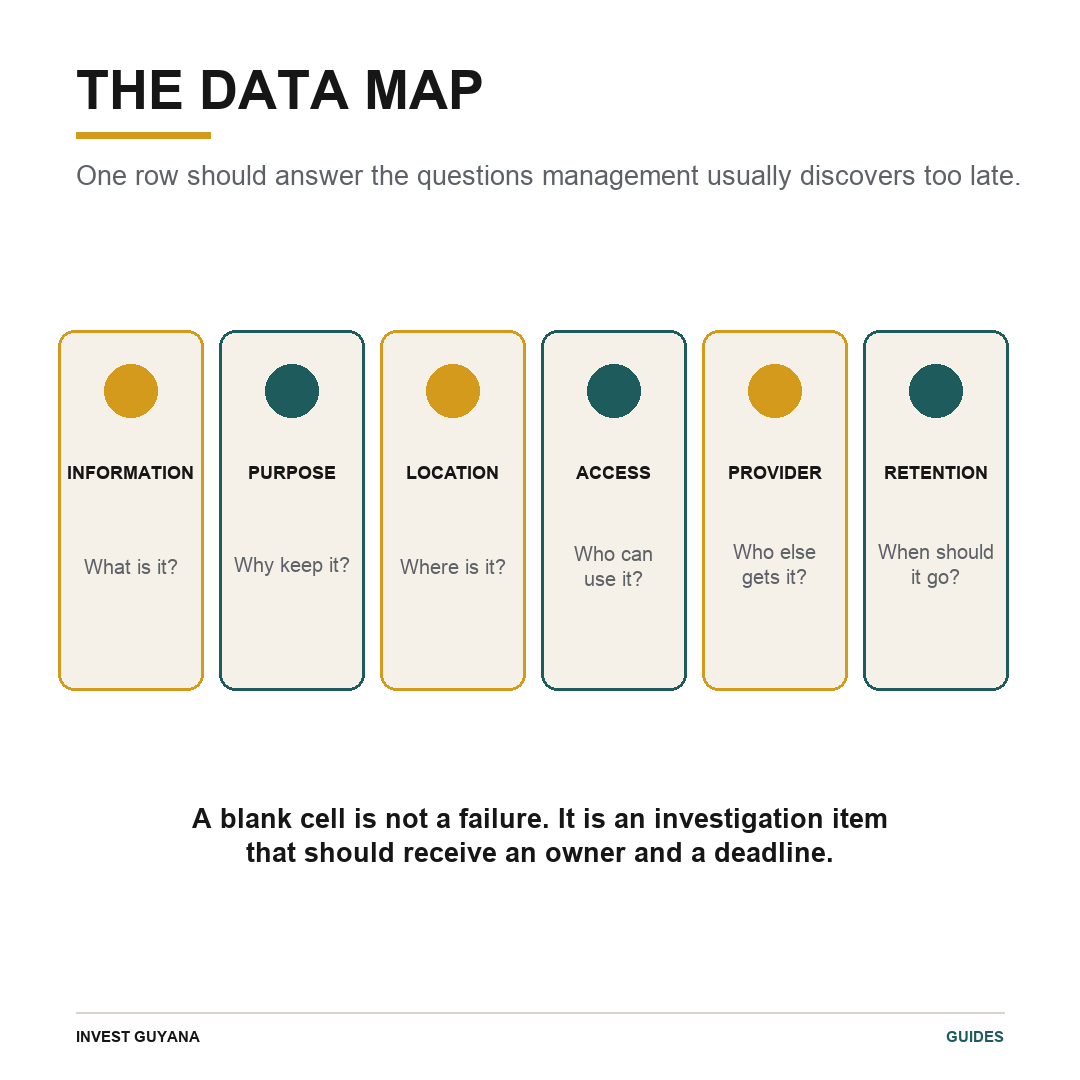
Create one working file with these columns:
- information category;
- people concerned;
- source of the information;
- purpose for holding it;
- system or physical location;
- people and roles with access;
- outside provider or recipient;
- retention reason and expected period;
- deletion or disposal method;
- responsible owner; and
- action required.
Blank cells are useful. They show where the business depends on assumption or on knowledge held by one employee.
Days 1–5: follow real transactions
Choose several ordinary journeys and trace them from beginning to end. Useful examples include hiring an employee, accepting a hotel booking, opening a customer account, delivering an order or processing a supplier payment.
For a hotel booking, record where the guest's name and contact details first arrive, whether payment information is handled by the hotel or a processor, whether correspondence remains in a shared inbox and whether staff export an arrival list. One guest may create several information flows; documenting only the reservation platform will miss the copies around it.
Walk through the workplace. Ask employees which spreadsheets they use, where paper forms are stored and what they send through email or messaging applications. Check shared drives, old laptops and archived accounts. The objective is not to blame staff. It is to understand the system that actually exists rather than the one described by a policy.
For every data category, answer three questions:
- What business or legal purpose does this serve?
- Would the task still work with less information?
- What happens to the information when that purpose ends?
Where a record must be retained for taxation, employment, a contract or another legal reason, identify the basis and obtain advice on the appropriate period. Do not apply one retention rule to every document.
Output for day 5: a first data inventory with unresolved items clearly marked.
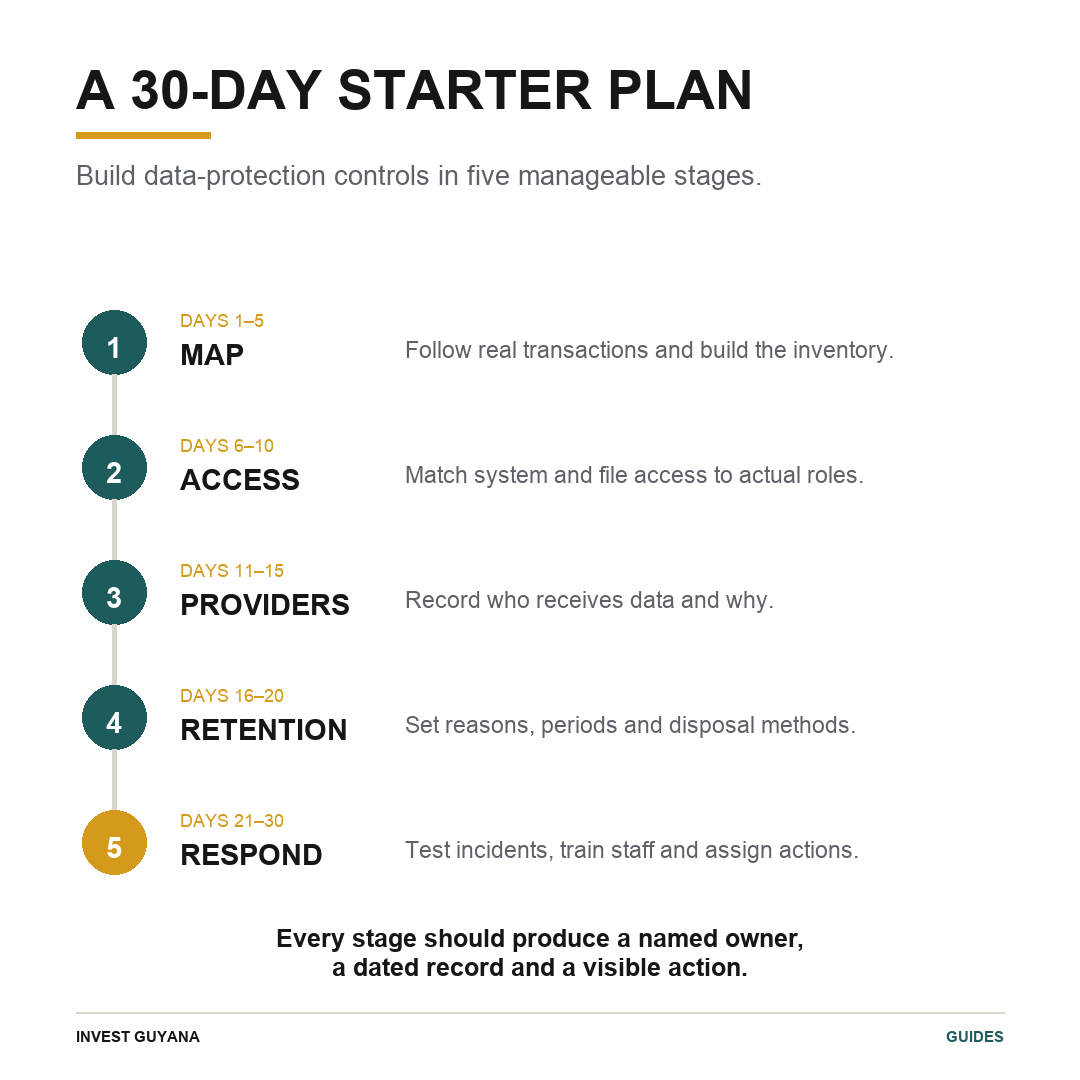
Days 6–10: match access to roles
Add four actions to the inventory: who can view, change, export and delete each category of information. Do not assume that access to a folder means the same thing as permission to use everything inside it.
A reservations clerk may need guest contact details but not payroll records. A supervisor may need staff schedules but not bank information. The person authorised to correct an address may not be the person authorised to delete a customer account.
Now check the employment cycle:
- Who approves access for a new employee?
- Who changes access when the employee changes role?
- Who removes access when the employee leaves?
- Which email, cloud, booking, payroll and device accounts must be closed?
- Who confirms that the work was completed?
Replace shared accounts where practical. Use individual accounts and strong authentication for important systems. Review exports that sit outside the main software, including spreadsheets downloaded to laptops or sent to personal accounts. The controls inside a booking platform cannot protect an uncontrolled copy.
Create a simple access matrix showing each system, approved roles, access level, approver and last review date. Ask managers to confirm it. The signature or email confirmation becomes evidence that access was reviewed rather than assumed.
Output for day 10: an approved access matrix and a joiner–role change–leaver checklist.
Days 11–15: review providers and information sharing
List every outside organisation that receives or can access personal information. Typical examples include accountants, payroll processors, cloud-storage providers, booking platforms, payment processors, security companies and marketing services.
For each provider, record:
- the information shared;
- the service being provided;
- the contract or terms governing the service;
- the provider's security and incident contact;
- any subcontractor or overseas processing disclosed to you;
- how records can be retrieved, returned or deleted when the service ends; and
- the person responsible for the relationship.
Do not rely only on sales statements. Compare the provider's promise with the written agreement and with the way staff actually use the product. A platform may offer restricted access, but the benefit is lost if everyone shares one administrator account.
International groups should document the local flow. If employee information from Guyana is entered into a regional human-resources system, identify who controls the system, which affiliates can access the records and what support exists if an individual raises a concern. A global privacy policy is not a data map.
Output for day 15: a provider register and a priority list of contracts or practices requiring review.
Days 16–20: decide what to keep and what to remove
Group records by category and document a retention reason. The period may come from law, a contract, an operational need or a defensible limitation period. Because those rules vary, the schedule should identify the basis rather than state an unexplained number of years.
Then identify every copy. A former employee's record may exist in the human-resources folder, payroll platform, supervisor's email and a backup. Deleting one version does not complete the task.
Describe the disposal method. Paper containing sensitive information should not be placed intact in ordinary waste. Digital deletion should account for active systems, exports and practical backup arrangements. Where immediate deletion from a backup is not feasible, access and restoration procedures should be controlled.
Include record correction. Decide who can update inaccurate information, how changes are communicated to systems that received a copy and how disputes are recorded. Accuracy is not merely administrative tidiness; a wrong bank account, address or employment status can produce real harm.
Output for day 20: a retention and disposal schedule linked to the inventory.
Days 21–25: prepare an incident route
Write a one-page response card that staff can use when something goes wrong. It should tell them to report immediately to a named role, preserve the relevant message or log and avoid concealing or casually forwarding the material.
The response lead should then establish:
- what happened and when;
- which systems, people and information are affected;
- whether exposure is continuing;
- what can be contained or recovered;
- which provider or specialist must be contacted;
- what evidence should be preserved;
- who decides on legal, contractual or individual notifications; and
- who records the reasoning and follow-up action.
Do not make the employee who caused the incident decide whether formal reporting is required. That assessment needs appropriate authority and, where necessary, professional advice.
Run a short tabletop test. Use a realistic scenario: a customer list is emailed to the wrong address, a company laptop is lost or a former employee can still enter the booking system. Ask the team to follow the card. If contact details are missing or nobody knows who can disable access, the exercise has found a useful gap.
Output for day 25: a tested response card, contact list and incident log template.
Days 26–30: explain the rules and assemble evidence
Turn the findings into short, usable instructions. Staff should know:
- what information they may collect;
- where authorised records belong;
- when they may share information;
- which personal devices or applications are prohibited;
- how to report a mistake or suspicious message; and
- who answers customer or employee questions.
Training should use examples from the business, not generic slogans. A hotel team can practise handling guest lists. A contractor can discuss applicant documents. A retailer can examine delivery records and marketing contacts. Ask staff to demonstrate the correct process rather than only sign an attendance sheet.
Assemble an evidence pack containing the inventory, access matrix, provider register, retention schedule, incident plan, training record and action log. Record the version date and the person who approved each document. This pack helps management see what has been completed and gives advisers a reliable starting point.
Close the 30-day exercise with a prioritised action plan. Address high-risk gaps first: uncontrolled sensitive files, former staff access, missing backups, shared administrator accounts or a provider relationship with no support contact. Longer software improvements can be budgeted, but they should remain assigned and dated.
Keep the checklist alive
Review the inventory when the business opens a new location, changes software, launches online payments, introduces cameras or biometrics, begins a marketing programme or collects a new category of information. Even without a major change, management should schedule a periodic review appropriate to the size and risk of the operation.
The completed checklist should answer five questions without guesswork:
- What personal information do we hold?
- Why do we hold it?
- Who can access or receive it?
- How long do we keep it?
- What do we do when something goes wrong?
If the business cannot answer one of those questions, the correct response is not to manufacture certainty. Record the gap, assign an owner and investigate it.
The company in our opening example will not finish the month with a perfect privacy programme. It should finish with something more valuable than an unsigned template: a verified map of its information, accountable owners and a practical route for reducing risk. Those controls support customer trust, due diligence and operational resilience today, while making future legal implementation easier to manage.
Editorial note: This Guide provides general operational information, not legal or cybersecurity advice. Businesses should verify the current commencement status of the Data Protection Act and seek appropriate professional advice for their activities, systems and contractual obligations.